How to read this page
This is a maintained comparison of what the major language-model APIs actually cost, assembled from each vendor's own published pricing rather than from third-party summaries. It replaces nine separate DevPik posts that each captured one vendor at one moment — useful the week they were written, misleading a month later.
Two conventions run throughout:
Every figure carries the date it was verified. LLM pricing changes faster than almost anything else in software infrastructure. A table without dates is a trap, so where a number is old enough that you should check before acting on it, it says so.
Unknowns are marked as unknown. Where a vendor has not published a rate — which happens surprisingly often with newly announced models — this page says "not published" rather than estimating. A guess dressed as data is worse than an admitted gap.
All prices are US dollars per million tokens. Where a vendor distinguishes cached from uncached input, both appear, because for most real workloads the cache rate is the number that determines your bill.
The comparison table
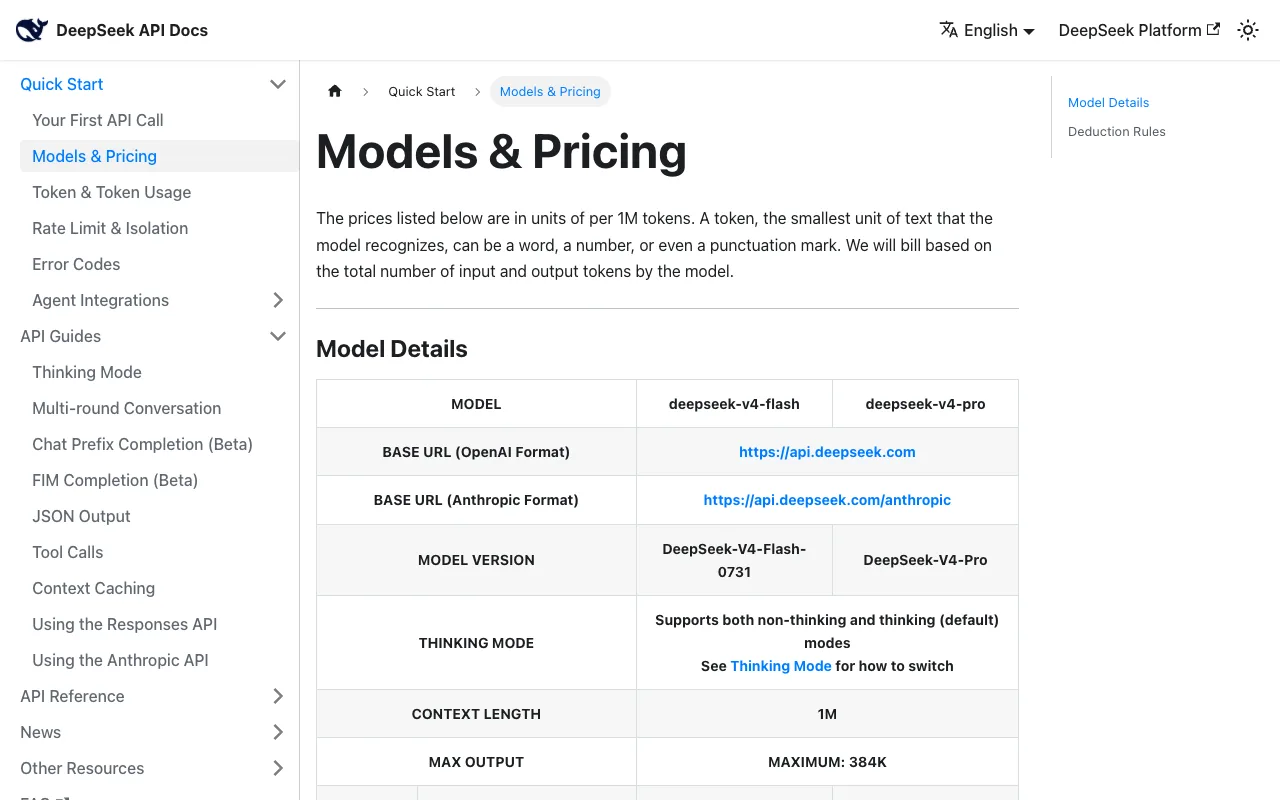
Verified 2026-08-25 against [Anthropic's pricing documentation](https://platform.claude.com/docs/en/about-claude/pricing) and [DeepSeek's pricing page](https://api-docs.deepseek.com/quick_start/pricing). Rows marked with an earlier date have not been re-verified since then — check the vendor before budgeting against them.
Anthropic (Claude) — cache reads are a flat 0.1× base input across the range.
| Model | Input | Cache read | Output | Verified |
|---|---|---|---|---|
| Claude Fable 5 | $10.00 | $1.00 | $50.00 | Aug 2026 |
| Claude Opus 5 | $5.00 | $0.50 | $25.00 | Aug 2026 |
| Claude Sonnet 5 | $2.00 | $0.20 | $10.00 | Aug 2026 |
| Claude Haiku 4.5 | $1.00 | $0.10 | $5.00 | Aug 2026 |
| Claude Opus 4.6 | $5.00 | $0.50 | $25.00 | Aug 2026 |
| Claude Sonnet 4.6 | $3.00 | $0.30 | $15.00 | Aug 2026 |
DeepSeek — priced by time of day, which almost nothing else in this market does. Off-peak is half of peak.
| Model | Input (miss) | Input (hit) | Output | Window |
|---|---|---|---|---|
| deepseek-v4-flash | $0.22 | $0.007 | $0.66 | Off-peak |
| deepseek-v4-flash | $0.44 | $0.014 | $1.32 | Peak |
| deepseek-v4-pro | $0.66 | $0.022 | $1.98 | Off-peak |
| deepseek-v4-pro | $1.32 | $0.044 | $3.96 | Peak |
Peak is 01:00–04:00 and 06:00–10:00 UTC, Monday to Friday. Everything else, including all weekend, is off-peak.
Others — carried over from earlier reporting and not re-verified in August 2026.
| Model | Input | Cache read | Output | Verified |
|---|---|---|---|---|
| Meta Muse Spark 1.2 (Standard) | $1.25 | $0.15 | $4.25 | Aug 2026 |
| Meta Muse Spark 1.2 (Contributor) | $0.10 | $0.002 | $0.20 | Aug 2026 |
| GLM-5.2 | $1.40 | $0.26 | not published | Aug 2026 |
| GLM-5 | $1.00 | $0.20 | not published | Aug 2026 |
| GLM-4.7 | $0.60 | $0.11 | not published | Aug 2026 |
Two corrections worth stating plainly
Earlier DevPik posts — and a lot of other coverage — listed Claude Opus 4.6 at $15 input / $75 output. That is wrong. $15/$75 is the rate for the retired Opus 4.1 and Opus 4. Opus 4.6 is $5/$25, a third of what was widely reported. The same posts listed Haiku 4.5 at $0.80/$4, which is the retired Haiku 3.5 rate; Haiku 4.5 is $1/$5.
If you built a cost model on the $15/$75 figure, you over-budgeted Opus by 3×. This page exists partly because that error propagated for months, and a table with a verification date attached is the only thing that catches it.
What the corrected numbers actually show
The frontier got dramatically cheaper. Opus-class access at $5/$25 rather than $15/$75 changes which workloads are viable. A lot of "we can't afford the good model" architecture was designed around the older, higher number.
Sonnet 5 is the value story. At $2 input and $10 output it undercuts Sonnet 4.6 ($3/$15) while being the newer model — a rare case of a generation getting both better and cheaper. Anthropic's launch pricing was scheduled to rise to $3/$15 on 1 September 2026; the docs now state that increase will not happen and $2/$10 is the standard rate.
Caching is a flat 10× discount across Anthropic's range. Every model reads cache at 0.1× base input. That predictability makes cache-hit rate, not model choice, the main lever once you have picked a tier.
DeepSeek is still the cheapest by a wide margin, but less so than it was. Off-peak flash at $0.22 input is roughly 9× cheaper than Sonnet 5 — a big gap, though narrower than the 15× it was at $0.14 before the increase. Schedule batch work off-peak and you halve it again.
Cache pricing and time-of-day pricing
Two structural discounts matter more than picking a different vendor.
Caching
For any workload with a stable prefix — a system prompt, tool schemas, a codebase digest, a document you ask repeated questions about — the cache rate is what you actually pay on most of your input.
Anthropic charges a flat 0.1× base input on cache reads, so Opus 5 drops from $5.00 to $0.50 and Sonnet 5 from $2.00 to $0.20. Writes cost more than base — 1.25× for the 5-minute cache, 2× for the 1-hour cache — which sets the break-even: a 5-minute cache pays for itself after one read, a 1-hour cache after two.
DeepSeek's cache discount is far steeper: $0.22 down to $0.007, a 31× reduction.
Put the stable content first. Caches key on prefixes. A prompt that varies at the top and stabilises at the bottom gets no cache benefit at all, even though it contains identical tokens to one that would cache almost completely. System prompt, tool definitions and reference material at the front; the varying request last. This is the single highest-return hour of work available in LLM cost engineering.
Time-of-day pricing
DeepSeek halves its rates outside 01:00–04:00 and 06:00–10:00 UTC on weekdays. Almost nothing else in this market prices by clock time, and it is easy to ignore because it does not appear in a headline rate.
For anything asynchronous — nightly batch jobs, backfills, evaluation runs, document processing — shifting the schedule is a 50% saving for a cron change. Combined with cache hits, off-peak flash input lands at $0.007 per million tokens, which is close enough to free that the cost stops being the thing you optimise.
Anthropic's equivalent lever is the Batch API: 50% off both input and output for asynchronous work, and it stacks with caching. Sonnet 5 batch is $1/$5. If your workload tolerates latency, not using it is leaving half the bill on the table.
What you get for the money
Price only means something next to capability. These are vendor-published benchmark figures, which means they are useful for rough positioning and should not be treated as independent measurement — every vendor picks the benchmarks that flatter it.
Coding and agentic benchmarks, as published by each vendor.
| Model | SWE-Bench Pro | Terminal-Bench | Notes | Published |
|---|---|---|---|---|
| Qwen 3.8 27B | 61.7% | — | Open weights, runs locally | Aug 2026 |
| Kimi K2.6 | 58.6% | 66.7 (v2.0) | Open weights | Apr 2026 |
| GLM-5.1 | 58.4% | 63.5 (v2.0) | MIT licensed | Apr 2026 |
| DeepSeek V4 Flash 0731 | — | 82.7 (v2.1) | MIT licensed | Aug 2026 |
| Meta Muse Spark 1.2 | 59.3% (DeepSWE) | 82.9% (v2.1) | Proprietary | Aug 2026 |
| GLM-5.3 | — | 28.3 (v3.0) | Newer, harder benchmark | Aug 2026 |
A warning about reading down these columns. Terminal-Bench 2.0, 2.1 and 3.0 are different benchmarks with different difficulty, and the numbers are not comparable across versions. GLM-5.3's 28.3 on v3.0 is not worse than GLM-5.1's 63.5 on v2.0 — v3.0 is simply much harder, and 28.3 was a 515% improvement over GLM-5.2's 4.6 on the same test. Vendors change benchmark versions between releases, which makes naive year-over-year comparison actively misleading.
The headline finding across all of this: open-weight models now sit at or near the top of published coding benchmarks while costing one to two orders of magnitude less than the proprietary frontier. Qwen 3.8 27B posting 61.7% on SWE-Bench Pro — as a model you can run on a single 24 GB consumer GPU — is the number that should reframe most cost planning.
Licensing is a cost dimension too
Per-token price is not the whole bill. A model you can run yourself has a completely different cost curve from one you can only rent, and the licence determines which you have.
MIT and Apache-licensed models — DeepSeek V4 Flash, GLM-5.1, Qwen 3.8 — can be self-hosted with no per-token cost at all. You trade a variable API bill for fixed hardware and operational overhead. That trade favours self-hosting at high, steady volume and favours the API at low or spiky volume. The crossover is usually further out than people expect, because GPU capacity sitting idle overnight is still being paid for.
Proprietary models — the Claude family, Meta Muse Spark — are API-only. You get managed scaling, no operational burden, and no option to escape the per-token meter.
Weight availability is not the same as practicality. DeepSeek V4 Flash is MIT-licensed, which sounds like it means you can run it. The weights are around 167 GB, which puts it far outside consumer hardware and well into multi-GPU server territory. "Open weights" tells you about your rights, not about your hardware. For what actually runs on a machine you own, see the companion page on running local models for coding.
Tiered pricing has conditions attached. Meta Muse Spark's Contributor tier is 12× cheaper than Standard on input. Tiers priced that far below the standard rate generally come with obligations — data sharing, attribution, usage restrictions — so read the terms before building a cost model on the cheap column.
How to actually cut the bill
In rough order of saving relative to effort:
1. Restructure prompts for cache hits. Stable prefix first, varying content last. A 10× reduction on the cached portion with Anthropic, 31× with DeepSeek, for an afternoon of work. Nothing else on this list has that ratio.
2. Use batch and off-peak windows for anything asynchronous. Anthropic's Batch API is 50% off and stacks with caching. DeepSeek's off-peak window is another 50%. Both are scheduling changes, not engineering ones.
3. Match the model to the task. The spread from Haiku 4.5 ($1/$5) to Fable 5 ($10/$50) is 10×. Most systems run one frontier model for everything because that was simplest to build; routing easy work to a cheaper tier is usually the largest structural saving available.
4. Re-check your assumed prices. The Opus 4.6 error above meant anyone using the widely-reported figure over-budgeted by 3×. Verify against the vendor's own page, and note the date you did it.
5. Use a planner-executor split. An expensive model produces a short plan, a cheap model executes it. Anthropic's published figures showed roughly 83% cost reduction at about 97% of frontier quality — and on several benchmarks it cost less than the cheap model alone, because better planning meant fewer wasted retries. The Claude Code reference covers implementation.
6. Cap output length deliberately. Output runs 2–5× input everywhere. Unbounded generation is where budgets die quietly.
7. Consider self-hosting only at steady high volume. Include hardware amortisation, power and your own time. Worse than it looks at low volume, better at high steady volume. See running local models.