The short answer
Cursor is an AI-powered code editor. Claude Code is an autonomous agent that lives in your terminal. That single architectural difference drives every other trade-off between them.
If you want the fast version:
- Pick Cursor if you write code hands-on, want inline autocomplete and visual diffs, or need to switch between models from different labs.
- Pick Claude Code if you want to delegate whole multi-file jobs and review the result, or if you refuse to leave JetBrains, Neovim, or Vim.
- Pick both — genuinely the most common setup among developers who use either seriously. Cursor as the daily editor, Claude Code for heavy refactors and migrations.
Entry pricing is close enough that cost is rarely the deciding factor: Cursor Pro is $20/month, Claude Pro is $20/month monthly or $17/month billed annually. The real divergence appears at the heavy-usage tiers, and that is covered below.
The rest of this guide is the detail behind those recommendations — verified pricing for every tier, what each tool genuinely does better, and how to choose by scenario rather than by vibe.
The architectural difference that drives everything
Cursor is a fork of VS Code. You install it as your editor, and the AI is woven through the editing surface — autocomplete as you type, inline edits, chat that sees your open files, visual diffs you accept or reject.
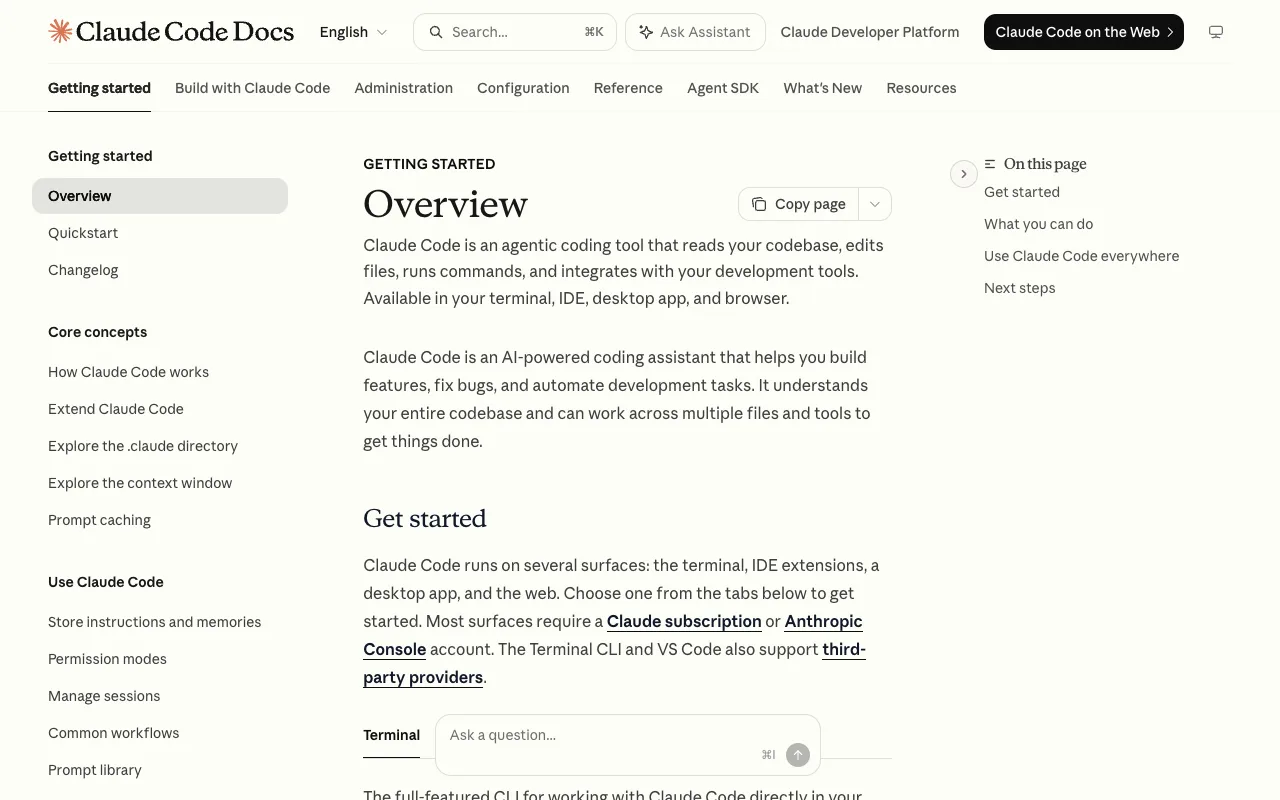
Claude Code is a terminal program. It has no editor of its own and does not care which one you use. You point it at a repository, describe an outcome, and it reads files, writes code, runs commands, reads the output, and iterates until it thinks it is done.
Two consequences follow, and they explain most disagreements about which is better:
1. Cursor keeps you in the loop; Claude Code takes you out of it. In Cursor you are steering continuously — reviewing suggestions, accepting hunks, redirecting. With Claude Code you write a prompt and come back to a completed diff. Neither is universally correct. It depends on whether your instinct is to supervise or delegate.
2. Cursor replaces your editor; Claude Code doesn't. This is the sharpest practical filter. If you have a decade of JetBrains muscle memory or a Neovim config you have been tuning since 2019, Cursor asks you to give that up. Claude Code runs in a terminal split alongside whatever you already use.
One caveat on the old framing. "Cursor is the IDE, Claude Code is the agent" was cleanly true in 2025 and is blurrier now — Cursor has cloud agents and CLI access, Claude Code has editor integrations. The distinction that survives is workflow philosophy and default autonomy, not raw capability.
Cursor pricing, verified
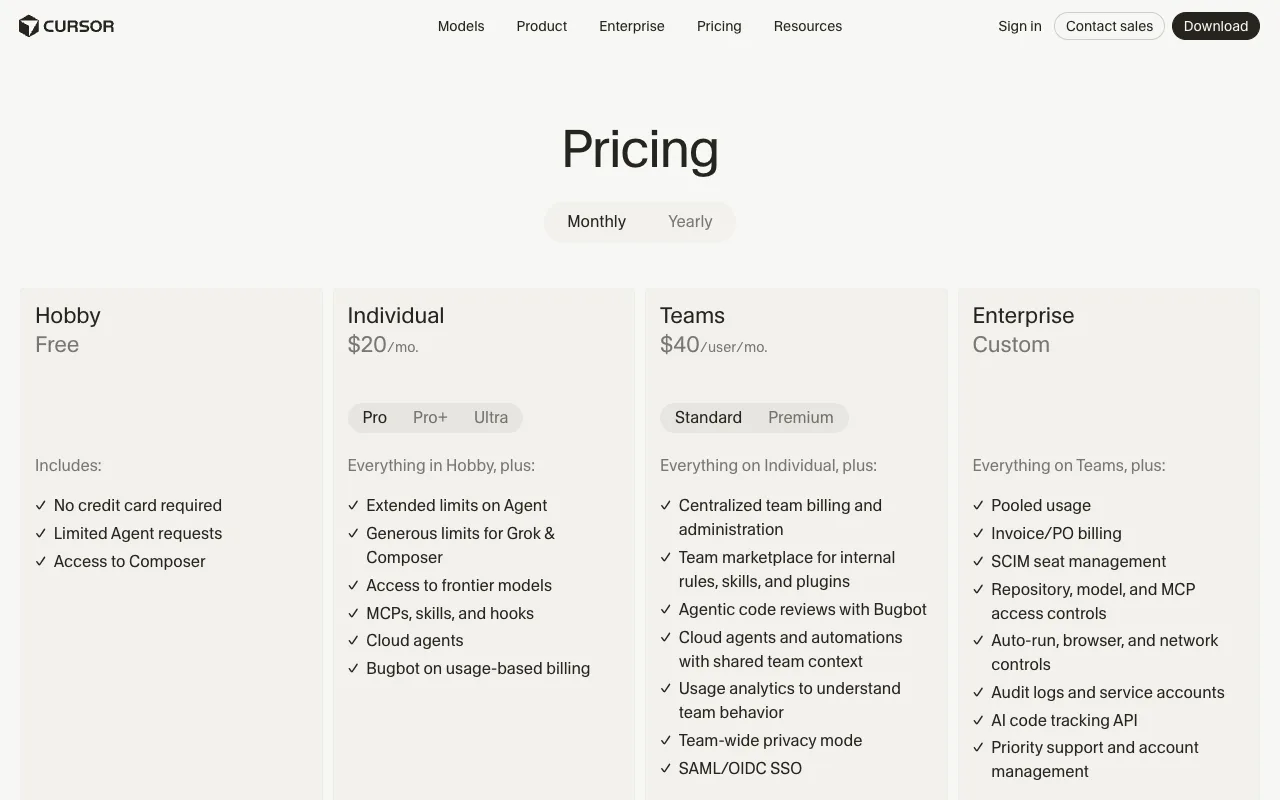
Straight from Cursor's pricing page:
| Plan | Cost | Notes |
|---|---|---|
| Hobby | Free | No credit card. Limited Agent requests, Composer access |
| Pro | $20/mo | Extended Agent limits, frontier models, MCPs/skills/hooks, cloud agents |
| Pro+ | ~$60/mo | Higher usage ceiling |
| Ultra | ~$200/mo | Roughly 20× Pro usage, priority access to new features |
| Teams | $40/user/mo | Centralized billing, team marketplace, Bugbot code reviews, usage analytics, SAML/OIDC SSO |
| Enterprise | Custom | Pooled usage, SCIM, audit logs, access controls, AI code tracking API |
Cursor's official tier breakdown is the panel at the top of this post. Annual billing takes roughly 20% off. Two things worth flagging: the free Hobby tier is real — rate-limited, but enough to evaluate the tool properly before paying — and Bugbot, Cursor's agentic code reviewer, bills on usage on top of the Pro subscription rather than being included.
Claude Code pricing, verified
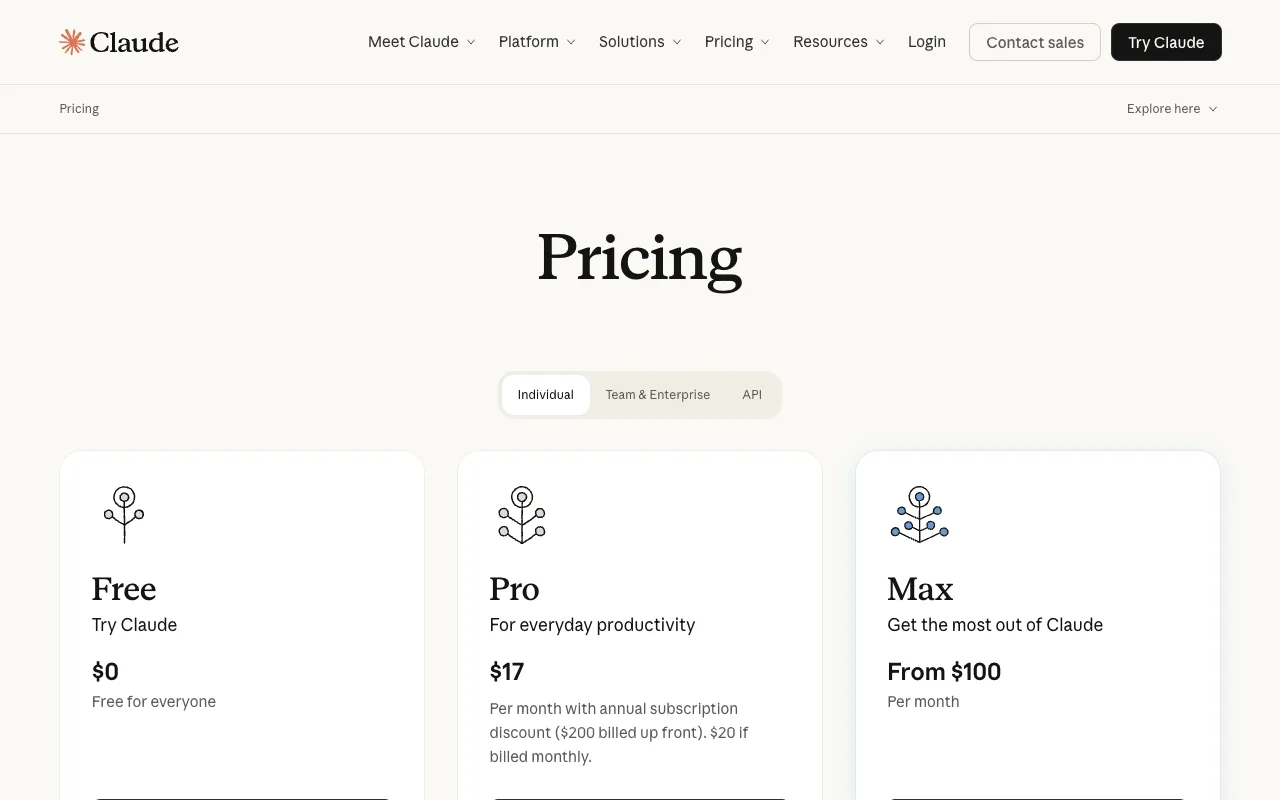
There is no standalone Claude Code product. It is bundled into Claude subscriptions, per Anthropic's pricing page:
| Plan | Cost | Claude Code access |
|---|---|---|
| Free | $0 | ❌ No CLI access |
| Pro | $17/mo annual ($200 up front) or $20/mo monthly | ✅ Enough for a few hours of daily work |
| Max 5× | From $100/mo | ✅ 5× Pro's usage window |
| Max 20× | ~$200/mo | ✅ 20× Pro's usage window |
| Team | ~$20/seat Standard | ⚠️ Claude Code requires Premium seats (~$100/seat) |
| API | Pay-as-you-go | ✅ Billed per token instead of per month |
Two structural things to understand before committing.
There is no free tier for the CLI. Cursor's Hobby plan lets you evaluate for free; Claude Code does not. The cheapest genuine trial is one month of Pro.
Usage runs on two clocks. Anthropic enforces a rolling 5-hour window that starts with your first message, plus a weekly cap on top. This catches people out: you can be well inside your weekly budget and still hit a wall mid-afternoon. Heavy daily users generally land on Max; irregular users often come out cheaper on pay-as-you-go API billing, especially with prompt caching.
The Team tier deserves a warning. At a glance it reads as $20/seat, but Claude Code access is gated to Premium seats at roughly $100/seat — a 5× difference that has surprised more than one team lead mid-rollout.
What Claude Code does better
Long autonomous runs. This is the core advantage. A task that takes fifteen minutes of back-and-forth in Cursor's agent mode can often complete in a single unattended Claude Code run. You describe the outcome, do something else, and review a diff. For multi-file refactors, framework migrations, and "rename this concept across 40 files" work, that difference compounds.
Editor independence. It runs alongside VS Code, JetBrains, Neovim, Vim, Emacs — anything. You keep your keybindings, your plugins, your muscle memory. For developers with heavily customised environments this alone settles the question.
Terminal-native composition. Because it is a CLI, it composes with everything else in your terminal — pipes, scripts, CI, tmux, SSH sessions into remote boxes. You can run it somewhere Cursor cannot go.
Token efficiency on comparable tasks. Independent 2026 comparisons have reported Claude Code consuming substantially fewer tokens than Cursor for equivalent work — one measured roughly 5.5× fewer. Treat the exact multiple as indicative rather than settled, since it depends heavily on task shape, but the direction is consistently reported.
We have covered the tool's mechanics in more depth in our Claude Code agent view guide, and the subscription metering changes are worth reading before you plan a budget around it.
What Cursor does better
Model flexibility. This is Cursor's strongest structural advantage and it is not close. You can switch between Anthropic, OpenAI, Google, and xAI models depending on the task. Claude Code is locked to Anthropic's models by design. If a different lab ships the best coding model next quarter, Cursor users switch and Claude Code users wait.
That matters more in 2026 than it did a year ago. As we found comparing Meta's Muse Spark 1.2 and DeepSeek's V4 Flash, the price-performance leader now changes every few weeks.
Inline autocomplete and line-by-line work. For the actual act of typing code, a tuned editor beats a terminal agent. Tab completion, multi-line suggestions, and instant inline edits are where Cursor is strongest, and an agent that returns finished diffs cannot replicate that feel.
Visual review. Diffs rendered in the editor, click to accept or reject per hunk, jump straight to the file. Reviewing a large agent-generated change is genuinely easier in a GUI than in a terminal.
A real free tier. Hobby costs nothing and requires no card. For evaluating the category at all, that is the lowest-friction starting point available.
Team code review. Bugbot performs agentic code review on pull requests. There is no direct Claude Code equivalent bundled at the same tier.
Which should you pick?
By scenario, which is how this decision actually gets made:
| Your situation | Pick |
|---|---|
| You live in JetBrains, Neovim, or Vim | Claude Code — Cursor means abandoning your editor |
| You want to try AI coding for $0 | Cursor — the Hobby tier is free, Claude Code has no free CLI |
| You mostly do big refactors and migrations | Claude Code — long autonomous runs are its core strength |
| You write code hands-on all day | Cursor — autocomplete and inline edits win |
| You want to switch models by task | Cursor — Claude Code is Anthropic-only |
| You need agentic PR review for a team | Cursor — Bugbot has no bundled equivalent |
| You are on a tight, predictable budget | Claude Pro annual at $17/mo is the cheapest serious entry |
| You run agents many hours a day | Claude Max or Cursor Ultra — compare against your real usage |
The honest answer for most working developers is both. At $20 + $20 a month, running Cursor as the editor and Claude Code for heavy delegated work costs less than a single seat of most commercial dev tooling, and the two genuinely complement rather than duplicate each other. Explore and refine in the IDE; hand the big mechanical job to the terminal agent; review its diff in the editor you already have open.
If you want a $0 version of the terminal-agent workflow to try the pattern before paying for it, our Codex + Ollama guide covers running an open-weight model through a CLI harness.
Verdict, and sources
There is no winner here, and any comparison that declares one is selling something. These are different shapes of tool that happen to overlap.
Cursor is the better product if your instinct is to stay in the loop, if you value model flexibility, or if you want to start free. Claude Code is the better product if your instinct is to delegate, if your editor is non-negotiable, or if your work is dominated by large mechanical changes.
The one prediction worth making: model flexibility gets more valuable, not less. The price-performance frontier is moving every few weeks right now, and a tool locked to one lab inherits that lab's roadmap. That is a real argument for Cursor as the primary tool, with Claude Code as the specialist you reach for on heavy jobs.
Sources
- Cursor — Pricing — Hobby, Individual, Teams and Enterprise tiers, feature breakdown
- Anthropic — Claude Pricing — Free, Pro, Max tiers and annual vs monthly rates
- Claude Code documentation — terminal architecture and editor independence
- Builder.io — Claude Code vs Cursor — workflow comparison
- SSD Nodes — Claude Code Pricing in 2026 — usage windows and Team seat gating
Pricing verified against both vendors' official pages on August 11, 2026. AI tool pricing changes frequently — confirm current rates before committing to an annual plan.