Every Browser Port Takes One of Three Routes
Getting a game to run in a browser tab used to mean rewriting it in JavaScript. WebAssembly changed that. Browsers now run compiled C, C++ and Rust at close to native speed, inside the same sandbox as any web page, so most of the work is no longer rewriting the game. It is adapting the game to a host that owns the main thread, the GPU, the keyboard and the network.
How much adapting depends on the route you take:
| Route | What you need | Examples | The hard part |
|---|---|---|---|
| Compile the engine | C or C++ source code | Doom, Quake, Half-Life on Xash3D | Renderer and main loop |
| Export from an engine | A Unity or Godot project | Most new indie web builds | Build size and server headers |
| Emulate the hardware | An emulator with a WebAssembly build | DOS games on js-dos, retro consoles on EmulatorJS | Performance and game files |
Compiling the engine is the classic port. If you have the source, either your own or an open source engine, Emscripten compiles it to WebAssembly. Half-Life runs in browsers this way through Xash3D, an open source engine compatible with Valve's GoldSrc.
Exporting from an engine is the shortest path for new games. Unity's Web platform and Godot's web export both produce a WebAssembly build straight from the editor. Unreal is the exception: Epic removed the HTML5 target in Unreal Engine 4.24 and handed it to the community.
Emulating the hardware skips porting entirely. You compile an emulator such as DOSBox or a libretro core to WebAssembly and feed it the original game, which is how js-dos and EmulatorJS work.
If you want to see what finished ports from all three routes feel like before you build one, PlayGamesInBrowser collects them in a single catalog, from engine source ports to emulated console games. Pay attention to how long the first load takes and to what happens when you click into a game, because those two moments are where most of the engineering in this guide goes.
Emscripten Compiles the Engine, but Your Main Loop Has to Give the Tab Back
Emscripten is the standard toolchain for the first route. It wraps Clang and LLVM, outputs a .wasm module plus the JavaScript glue that loads it, and ships ports of the libraries games usually depend on. SDL2 is one flag away, and OpenGL ES 2 and 3 calls map onto WebGL 1 and 2 almost directly.
A first build of an SDL2 game looks something like this:
emcc src/*.c -O3 \
  -sUSE_SDL=2 \
  -sMAX_WEBGL_VERSION=2 \
  -sALLOW_MEMORY_GROWTH=1 \
  --preload-file assets \
  -o index.html
That produces index.html, index.js, index.wasm and index.data. The last one is your assets folder packed into a single file and mounted into a virtual file system before main() runs.
It will compile. It will very likely freeze the tab the moment it starts, and the reason is the main loop.
A desktop game owns its process. It sits in while (running) { tick(); } forever, and the operating system interrupts it whenever it needs to. A browser tab works the other way round. The page only repaints, delivers input events and completes network requests when your code returns control to the event loop. A loop that never returns gets a frozen tab and, a few seconds later, a "Page Unresponsive" dialog.
The fix is to turn the loop inside out, so the browser calls you once per frame:
#include <emscripten.h>

static void frame(void) {
    poll_input();
    update_world();
    render();
}

int main(void) {
    init_game();
    // An fps of 0 hands frame timing to requestAnimationFrame
    emscripten_set_main_loop(frame, 0, 1);
    return 0;
}
If the engine is too tangled to restructure, Emscripten's Asyncify mode (-sASYNCIFY) lets you keep the loop and call emscripten_sleep(0) inside it to yield. It works, but it makes the module noticeably larger and slower, so treat it as a bridge rather than the destination.
Two more problems show up early. Old engines written against fixed-function desktop OpenGL, the glBegin and glEnd era, have no direct WebGL equivalent. -sLEGACY_GL_EMULATION covers part of that API, and the rest means rewriting the renderer, which is often the biggest single job in a port. And the packed file system lives in memory, so save games vanish on reload unless you mount IDBFS (link with -lidbfs.js) and call FS.syncfs to persist them to IndexedDB.
WebGL 2 Is the Baseline, and WebGPU Is an Upgrade You Cannot Require Yet
WebGL 2 is the safe target. It corresponds roughly to OpenGL ES 3.0, it runs in every current browser, and an engine that already supports mobile GPUs has most of the work done. WebGPU is the modern API, modelled on Vulkan, Metal and Direct3D 12. It adds compute shaders, much lower CPU overhead per draw call and a new shader language, WGSL.
| WebGL 2 | WebGPU | |
|---|---|---|
| Modelled on | OpenGL ES 3.0 | Vulkan, Metal, Direct3D 12 |
| Shader language | GLSL ES 3.00 | WGSL |
| Compute shaders | No | Yes |
| Availability | Every current browser | Depends on browser, OS, GPU and driver |
| Porting older OpenGL code | Close mapping | Renderer rewrite |
Chrome shipped WebGPU in 2023 and other browsers have followed, but whether a given player gets it still depends on their operating system, GPU and driver. A browser can expose navigator.gpu and still refuse to hand you an adapter on a blocklisted GPU, so feature-detect the adapter, not the API:
const adapter = navigator.gpu ? await navigator.gpu.requestAdapter() : null;
const backend = adapter ? "webgpu" : "webgl2";
The engines show the same caution. Godot 4's web export renders through its WebGL 2 Compatibility renderer, and Unity 6 offers WebGPU as an opt-in graphics API alongside WebGL 2. Unless your game cannot run without compute shaders, ship WebGL 2 and treat WebGPU as an enhancement.
Threaded Builds Need Cross-Origin Isolation, Which an Ordinary iframe Cannot Provide
This is the problem that catches almost every first port, because the build works on your machine and fails the moment it is hosted somewhere else.
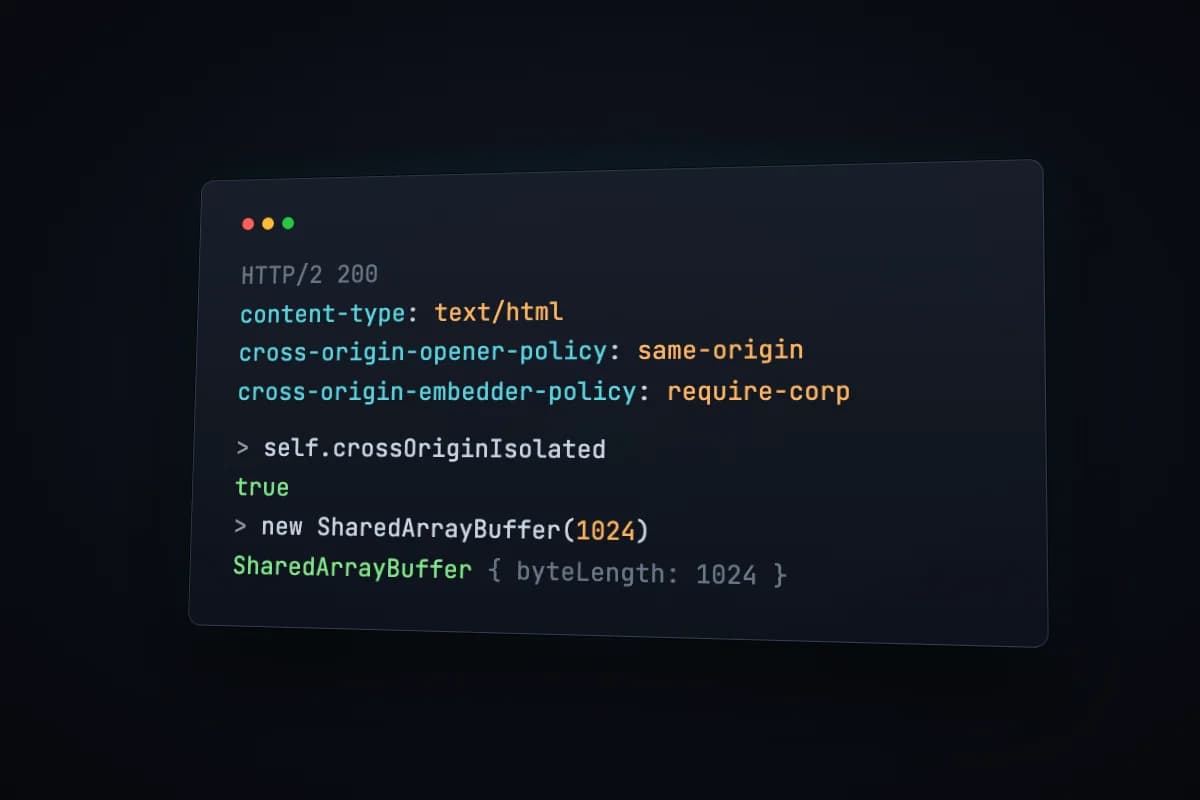
Engines use threads for audio mixing, asset streaming and physics. When you compile with -pthread, Emscripten maps C and C++ threads onto Web Workers, and all of those workers share one block of memory: a SharedArrayBuffer. Add -sPTHREAD_POOL_SIZE=4 (or however many threads the engine starts) so the workers are created up front, because a new worker cannot finish starting until the main thread yields.
Why SharedArrayBuffer is locked
In January 2018 the Spectre CPU flaws showed that a page with a precise enough timer could read memory it was never meant to see. Memory shared between threads makes a very precise timer, so browsers switched SharedArrayBuffer off. It came back only for pages that prove they are cross-origin isolated, and by the end of 2021 Chrome, Firefox and Safari all required that proof.
The proof is two response headers on the page that runs the game:
Cross-Origin-Opener-Policy: same-origin
Cross-Origin-Embedder-Policy: require-corp
Cross-Origin-Opener-Policy puts the page in its own browsing context group, so no cross-origin window can hold a reference to it. The side effect is that sign-in and payment popups which report back through window.opener stop working on that page.
Cross-Origin-Embedder-Policy makes every cross-origin resource opt in before it loads, either by sending Cross-Origin-Resource-Policy: cross-origin or by being fetched with CORS. The side effect is that third-party scripts, fonts, ad tags and embeds that do not send those headers get blocked. A softer value, credentialless, loads such resources without cookies instead of blocking them, but browser support is not universal, so require-corp remains the safe default.
Check the result before the engine starts, and show a real message instead of a crash:
if (!self.crossOriginIsolated) {
  showError("This build needs cross-origin isolation (COOP and COEP headers).");
}
Why the embed breaks
Isolation belongs to the top-level page, not to the frame. A game inside an iframe is only isolated if the page embedding it sends both headers, the frame's own response opts in with matching headers, and the iframe tag delegates the permission with allow="cross-origin-isolated". Drop a threaded build into an ordinary page, such as a blog post or a portal that runs ads, and inside the frame crossOriginIsolated is false, SharedArrayBuffer does not exist, and the game dies at startup.
That leaves any site hosting many games with a choice: isolate the whole site and lose every third-party script that does not opt in, or isolate only the page that runs the game. Most choose the second. It is why sites that collect browser ports, such as PlayGamesInBrowser, open threaded games in a separate full-screen player instead of an embedded frame. Their guide to how browser ports of PC games work covers the same split from the player's side, including which kinds of ports need it.
Send the headers on one route only
Scope the headers to the path that runs the game and leave the rest of the site alone. On Vercel, in vercel.json:
{
  "headers": [
    {
      "source": "/play/(.*)",
      "headers": [
        { "key": "Cross-Origin-Opener-Policy", "value": "same-origin" },
        { "key": "Cross-Origin-Embedder-Policy", "value": "require-corp" }
      ]
    }
  ]
}
Vercel refuses to deploy a vercel.json it cannot parse, so if you are hand-editing a large one, a quick pass through a JSON formatter catches the stray trailing comma before the build does.
On Netlify, in a _headers file:
/play/*
  Cross-Origin-Opener-Policy: same-origin
  Cross-Origin-Embedder-Policy: require-corp
On nginx:
location /play/ {
    add_header Cross-Origin-Opener-Policy same-origin always;
    add_header Cross-Origin-Embedder-Policy require-corp always;
}
Hosts that cannot set headers have workarounds. On GitHub Pages, the coi-serviceworker project registers a service worker that adds both headers to every response, at the cost of one reload on the first visit. itch.io has a SharedArrayBuffer option in a project's embed settings. And Godot 4.3 brought back single-threaded web exports so games can run on hosts that send neither header. If your game does not need threads, not using them is the simplest fix of all.
The First Load, Not the Frame Rate, Is What Loses Players
Frame rate gets the attention, but the number that actually loses players is the first load. Large engine ports routinely pull several hundred megabytes before the first frame. Do the arithmetic: 800 megabytes is 6,400 megabits, so on a 50 Mbps connection the player waits a little over two minutes, and on 10 Mbps more than ten. The unit converter handles the megabytes-to-megabits step, and running a speed test on an ordinary home connection, not your office fiber, tells you what your players will really sit through.
Four things shrink the wait:
- Compress, and send the right headers. WebAssembly compresses well with Brotli. Serve precompressed files with
Content-Encoding: br, and serve.wasmasContent-Type: application/wasm, which letsWebAssembly.instantiateStreaming()compile the module while it is still downloading. Unity users hit the header half of this constantly: a Brotli build on a server that does not sendContent-Encoding: brfails to load with an error blaming the server configuration. Browsers also only request Brotli over HTTPS. - Split the data. One giant
.datafile means nothing plays until everything arrives. Package the first level on its own (Emscripten'sfile_packagerbuilds extra packages) and fetch the rest while the player is already playing. - Cache it yourself. The browser's HTTP cache may evict a 500 MB file whenever it likes. Store game data in IndexedDB or the Cache API, call
navigator.storage.persist()to ask the browser not to evict it under storage pressure, and checknavigator.storage.estimate()before starting a download that will not fit. Unity's Data Caching option handles the IndexedDB part for you. - Show real progress. A spinner over a two-minute download reads as a broken page. A byte counter does not.
Mouse, Gamepad and Sound Each Wait for the Player to Click
Desktop games assume they own the input devices. Browsers make the page earn each one, which is why nearly every browser port opens on a "click to play" screen.
Mouse look needs the Pointer Lock API. Call requestPointerLock() from a click handler and read relative motion from movementX and movementY. Chromium also accepts unadjustedMovement: true for raw input without the operating system's mouse acceleration, which shooters want. Other browsers may reject the option, so fall back:
canvas.addEventListener("click", async () => {
  try {
    await canvas.requestPointerLock({ unadjustedMovement: true });
  } catch {
    canvas.requestPointerLock(); // no raw input support, use the default
  }
});
Escape always releases the lock, and the browser shows its own notice when the lock is taken. Do not fight either one.
The keyboard is mostly yours, with exceptions. Escape and browser shortcuts such as Ctrl+W stay with the browser. Chromium's Keyboard Lock API (navigator.keyboard.lock()) captures more of them, but only in fullscreen.
Gamepads are polled, not evented. Read navigator.getGamepads() once per frame. Browsers hide connected controllers until the player presses a button, as a fingerprinting defense, so prompt for a press instead of reporting "no controller found". When mapping is "standard", button and axis indexes follow one fixed layout:
function readPad() {
  const pad = navigator.getGamepads().find((p) => p && p.mapping === "standard");
  if (!pad) return null;
  return { moveX: pad.axes[0], moveY: pad.axes[1], jump: pad.buttons[0].pressed };
}
Audio starts muted. Under browser autoplay rules, an AudioContext created before any user gesture starts in the "suspended" state. Ports usually create theirs during engine startup, so the click-to-play handler should call audioContext.resume(). Fullscreen through requestFullscreen() needs a gesture too.
Engine Source and Game Files Are Licensed Separately
The last trap is legal rather than technical, and it surprises people who got everything else right. Releasing an engine's source code does not release the game.
id Software published the Doom source in 1997 and Quake's in 1999, which is why those engines have been ported to almost everything, the browser included. The WAD and PAK files holding the levels, textures, music and sounds stayed copyrighted. The same split applies to modern open source rebuilds: DevilutionX rebuilds Diablo's code, but it needs the game data from a copy you own, or the shareware data that was always free to pass around.
That leaves three clean options for a browser port:
- Ship assets you own or made. Your own game, or a project with free replacement assets, such as Freedoom for Doom engines.
- Ship data that is free to redistribute. Shareware episodes were released for exactly that purpose.
- Let players bring their own files. A file picker or drag-and-drop, with the data stored locally in IndexedDB or the Origin Private File System and never uploaded to your server.
Publishers sometimes do it themselves: Mojang put Minecraft Classic online at classic.minecraft.net in 2019 for the game's tenth anniversary. If you do not hold the rights to a game's data and it was never released for redistribution, it does not belong on your server, however good the port is.